Guide To The Uratama!
Posted: Wed Sep 23, 2026 8:49 pm
Originally posted on Tama Zone · 25 November 2006
Because of the numerous topics popping up with people asking for guides to the Uratama, I've decided to create a careguide to it. I'm going to try and base it as much as I can from Spiffy's Entama Guide on Tamatalk, (http://www.tamatalk.com/IB/index.php?showtopic=46216).
What exactly is an Uratama?
The Uratama is a Japanese Tamagotchi, released on the 22nd of July in Japan only. It has almost the same features as the Entama, but features a blue LCD screen, new characters, games, and new designs. The Uratama also connects to Photobooths in Japan. The Uratama's full name is Ura Jinsei Enjoy Tamagotchi Plus.
How do I get started?
After removing the Uratama from the package, carefully pull the tab. An introduction image appears on the screen, then you'll set the time, clock, birthday, etc. After that, an egg appears on the screen.
After 60 seconds, the egg will hatch. You will have one of 6 babies. Male or Female from either the Comedy, Gorgeous, or Passion. Each GUTS group determines the Character outcome.
Naming your Baby
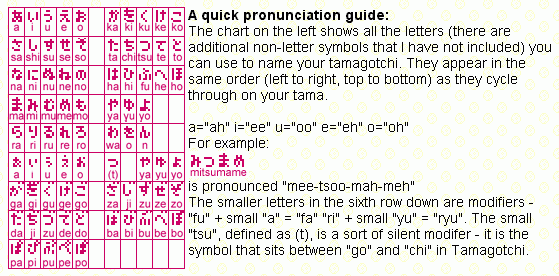
Use this chart from the EnTama/cho Jinsei Guide to help with naming your baby.
Icon 1 - Health Meter
The first Icon on the Uratama, like all Tamagotchis - is the Health Meter. Here, you check your Ura's status.
·First Screen - Hungry/Happy Hearts.
·Second Screen - GUTS Points. Here, check your Ura's GUTS status. There are 3 GUTS groups. Each Group is represented
with an Icon. A hand for the Comedy Group, a star for the Goregous Group, and a flame for the Passion Group.
·Third Screen - Type of Tamagotchi, Preschool/School/Job and Job level (rating from 1 to 3 stars) and number of Gotchi points. The maximum amount of Gotchi points is 99,999GP
·Fourth Screen - Check your Ura's name, age, and weight here.
·Fifth Screen - Gender and Generation.
Icon 2 - Food
Choose from various meals or snacks (meals first option - snacks the second) and cooking.
Cooking: To cook, retrieve cooking items from Ura-Tamatown (http://e-tamago.com/urapc/flash/uratama.html). If they are of the same GUTS group (have the same icon in the upper right corner), you can mix them together.
Icon 3 - Toilet
Pretty Simple. When your Uratama makes a mess, select the Toilet Icon. OR if you see stink lines on your Uratama, select this fast. Your Tamagotchi will sit on the Toilet.
Icon 4 - Games
The Uratama features 3 games.
·Tsukkomi game [hit the fool with a fan] - Move the fan around using buttons (A) and © to hit the jack-in-the-box and avoid the poop. To hit the jack-in-the-box, press button (B). Be careful, as the mole sometimes comes up again after you've hit it once! Increase Comedy Points.
·Takara Sagashi game [Treasure hunting] - Similar the Card Game from the Entama. Scroll through one of four places(Chandeleir, Picture, Chair, or Table) using button (A) to scroll, and button (B) to select. You're trying to find the Diamond behind one of these places. This game increases your Ura's Gorgeous Points.
·Kawarawari game [Break bricks with your hand] - When you play this game, you're trying to get as much power as possible. See the Bar on the bottom? As soon as it is mostly or all shaded in, press button (B) fast! Increases Passion Points.
10 points are awarded in the relevant category for completeing a game.
(Credit to Skillful Abbot for the correct game names.)
Icon 5 - Connection.
When you're new to the Uratama, they only option under this icon you'll need to worry about is the 5th option, PC connetion. The Uratama connects to the Ura-Tamatown.. When you select this option, you'll be given a 14-digit password. Enter the password at http://e-tamago.com/urapc/flash/uratama.html.
A more detailed guide to connection for EnTama and UraTama can be found here.
Icon 6 - Mailbox.
On the Uratama, as with EnTama, instead of a discipline icon, there is a post icon. Here, you check the mail. The first option is news?, the second is important mail.
Twice a day, a Nazotchi delivers the mail - When your Tamagotchi wakes up, and at 4:00 PM. Depending on what the mail said, your Uratama's mood can change.
Icon 7 - Medicine
When your Tamagotchi is sick, select this icon. Remember, sometimes, your Ura might need a double dose of Medicine!
Icon 8 - Items
Just like the Entama, all of your items you buy are stored here, along with items givien to you by your Nanny/Teacher.
The first selections are -
Work/School Items
GUTS Up Items
Medicines
Souvenirs
Misc. Items
Icon 9 - Friends list
·First option- Friends. Here, look at all the Tamagotchis that your Ura has connected to.
·Second option - Family. Just like the Entama and v3, you can view the past generation on your Tamagotchi.
·Third option - History. Here, look at the Tamagotchis you had that passed away.
Icon 10 - Attention
When ever your Tamagotchi needs attention, it will call and this icon will be highlighted.
Extras
·Sound - Like all Tamagotchis, by holding down buttons (A) and (B), you can turn on and off the sound. First option is on, second is off.
·Contrast - You can adjust the contrast by bringing up the Clock Screen then hold © and press (B), you will see the contrast bar, (A) makes it lighter, (B) makes it darker, © returns to the Clock Screen.
Teachers
When your Uratama is a toddler, a Nanny will visit your Uratama 3 times a day. All you have to do is press button (B). The Nanny will play w/ your Uratama.
When your character becomes a teenager, it will get 1 out of 3 different teachers- one for each GUTS group. The teacher you get depends on the majority of your Ura's GUTS points. When these teachers visit, you play a game. The teacher hides a symbol unter one of three presents and you want to selct the right one. Guess it right, and you'll get 10 GUTS points.
Graduation
After 72 hours of your Uratama becoming an Adult, it will graduate and get a job.
The Travelling Vendor
Since there isn't a shop on the Uratama, you can purchase items from the Ura-Tamatown, but an Ojitchi Vendor will come twice a day with an item that you can purchse on your Uratama, usally food. When he brings an item, press button (B). It will ask if you'd like to purchase the item. The first option is Yes, the second No. Please note that he will only offer one item per visit.
Characters
You can find all the Uratama Characters at viewtopic.php?t=28
EnWarehouse Version 5 is available here and has full compatability with UraTama (credit to Binary).
*Updated 21st September 2008* - Real_Three
From the Tama Zone archive: original topic
Because of the numerous topics popping up with people asking for guides to the Uratama, I've decided to create a careguide to it. I'm going to try and base it as much as I can from Spiffy's Entama Guide on Tamatalk, (http://www.tamatalk.com/IB/index.php?showtopic=46216).
What exactly is an Uratama?
The Uratama is a Japanese Tamagotchi, released on the 22nd of July in Japan only. It has almost the same features as the Entama, but features a blue LCD screen, new characters, games, and new designs. The Uratama also connects to Photobooths in Japan. The Uratama's full name is Ura Jinsei Enjoy Tamagotchi Plus.
How do I get started?
After removing the Uratama from the package, carefully pull the tab. An introduction image appears on the screen, then you'll set the time, clock, birthday, etc. After that, an egg appears on the screen.
After 60 seconds, the egg will hatch. You will have one of 6 babies. Male or Female from either the Comedy, Gorgeous, or Passion. Each GUTS group determines the Character outcome.
Naming your Baby
Use this chart from the EnTama/cho Jinsei Guide to help with naming your baby.
Icon 1 - Health Meter
The first Icon on the Uratama, like all Tamagotchis - is the Health Meter. Here, you check your Ura's status.
·First Screen - Hungry/Happy Hearts.
·Second Screen - GUTS Points. Here, check your Ura's GUTS status. There are 3 GUTS groups. Each Group is represented
with an Icon. A hand for the Comedy Group, a star for the Goregous Group, and a flame for the Passion Group.
·Third Screen - Type of Tamagotchi, Preschool/School/Job and Job level (rating from 1 to 3 stars) and number of Gotchi points. The maximum amount of Gotchi points is 99,999GP
·Fourth Screen - Check your Ura's name, age, and weight here.
·Fifth Screen - Gender and Generation.
Icon 2 - Food
Choose from various meals or snacks (meals first option - snacks the second) and cooking.
Cooking: To cook, retrieve cooking items from Ura-Tamatown (http://e-tamago.com/urapc/flash/uratama.html). If they are of the same GUTS group (have the same icon in the upper right corner), you can mix them together.
Icon 3 - Toilet
Pretty Simple. When your Uratama makes a mess, select the Toilet Icon. OR if you see stink lines on your Uratama, select this fast. Your Tamagotchi will sit on the Toilet.
Icon 4 - Games
The Uratama features 3 games.
·Tsukkomi game [hit the fool with a fan] - Move the fan around using buttons (A) and © to hit the jack-in-the-box and avoid the poop. To hit the jack-in-the-box, press button (B). Be careful, as the mole sometimes comes up again after you've hit it once! Increase Comedy Points.
·Takara Sagashi game [Treasure hunting] - Similar the Card Game from the Entama. Scroll through one of four places(Chandeleir, Picture, Chair, or Table) using button (A) to scroll, and button (B) to select. You're trying to find the Diamond behind one of these places. This game increases your Ura's Gorgeous Points.
·Kawarawari game [Break bricks with your hand] - When you play this game, you're trying to get as much power as possible. See the Bar on the bottom? As soon as it is mostly or all shaded in, press button (B) fast! Increases Passion Points.
10 points are awarded in the relevant category for completeing a game.
(Credit to Skillful Abbot for the correct game names.)
Icon 5 - Connection.
When you're new to the Uratama, they only option under this icon you'll need to worry about is the 5th option, PC connetion. The Uratama connects to the Ura-Tamatown.. When you select this option, you'll be given a 14-digit password. Enter the password at http://e-tamago.com/urapc/flash/uratama.html.
A more detailed guide to connection for EnTama and UraTama can be found here.
Icon 6 - Mailbox.
On the Uratama, as with EnTama, instead of a discipline icon, there is a post icon. Here, you check the mail. The first option is news?, the second is important mail.
Twice a day, a Nazotchi delivers the mail - When your Tamagotchi wakes up, and at 4:00 PM. Depending on what the mail said, your Uratama's mood can change.
Icon 7 - Medicine
When your Tamagotchi is sick, select this icon. Remember, sometimes, your Ura might need a double dose of Medicine!
Icon 8 - Items
Just like the Entama, all of your items you buy are stored here, along with items givien to you by your Nanny/Teacher.
The first selections are -
Work/School Items
GUTS Up Items
Medicines
Souvenirs
Misc. Items
Icon 9 - Friends list
·First option- Friends. Here, look at all the Tamagotchis that your Ura has connected to.
·Second option - Family. Just like the Entama and v3, you can view the past generation on your Tamagotchi.
·Third option - History. Here, look at the Tamagotchis you had that passed away.
Icon 10 - Attention
When ever your Tamagotchi needs attention, it will call and this icon will be highlighted.
Extras
·Sound - Like all Tamagotchis, by holding down buttons (A) and (B), you can turn on and off the sound. First option is on, second is off.
·Contrast - You can adjust the contrast by bringing up the Clock Screen then hold © and press (B), you will see the contrast bar, (A) makes it lighter, (B) makes it darker, © returns to the Clock Screen.
Teachers
When your Uratama is a toddler, a Nanny will visit your Uratama 3 times a day. All you have to do is press button (B). The Nanny will play w/ your Uratama.
When your character becomes a teenager, it will get 1 out of 3 different teachers- one for each GUTS group. The teacher you get depends on the majority of your Ura's GUTS points. When these teachers visit, you play a game. The teacher hides a symbol unter one of three presents and you want to selct the right one. Guess it right, and you'll get 10 GUTS points.
Graduation
After 72 hours of your Uratama becoming an Adult, it will graduate and get a job.
The Travelling Vendor
Since there isn't a shop on the Uratama, you can purchase items from the Ura-Tamatown, but an Ojitchi Vendor will come twice a day with an item that you can purchse on your Uratama, usally food. When he brings an item, press button (B). It will ask if you'd like to purchase the item. The first option is Yes, the second No. Please note that he will only offer one item per visit.
Characters
You can find all the Uratama Characters at viewtopic.php?t=28
EnWarehouse Version 5 is available here and has full compatability with UraTama (credit to Binary).
*Updated 21st September 2008* - Real_Three
From the Tama Zone archive: original topic