Angelgotchi Guide
Posted: Wed Sep 23, 2026 8:49 pm
Originally posted on Tama Zone by ilovetamas! · 2 August 2006
Hey guys! This here is a guide for angelgotchis that I made.
Lets start out with the basic icons:
Meter icon (first icon): This meter icon allows you to check on an angelgotchi's health, age, good deeds bar, and angelpower. When you select this icon the first screen you will see is how much angel power your angel has and how old your angel is. the first set of numbers is how old your angel is. the second set of numbers below that set is how much angel power your angel has. You get angel power by simply giving your angel a snack, or praising it. that raises your angel power also. The second screen that comes up when you press the B button (middle button) is the training bar. It goes up when when you praise your angel for praying for you. most characters call you when they pray for you, but maruten (child form of angel) doesnt call for you and niether does a few of the unhealthier characters. The third screen that comes up when you press the B button is the hungrey hearts meter. When one or more of the hungrey hearts empties that shows how many pies you have to feed it. The fourth and final screen that comes up when you press the B button is the happy hearts meter. when one or more of these hearts empy, thats when you have to play a game with it. Unlike the other types of tamas where you just have to feed it a snack to fill up the happy hearts, in this case you have to play a game to fill up the hearts. the game you play is a shooting stars game. in this game you have to jump over the shooting stars. if you jump over three stars then that fills one happy heart. jump over all five and you gain three happy hearts.
Fork and knife icon (second icon): This icon allows you to go to the food screen, where you can either feed it pie or candy. The selection at the top is the one that feeds your angel a pie. The one below is the one that feeds it candy. Feed your angel a pie and it fills one hungrey heart. Give it the number of hungrey hearts that are empty. Such as: Your angel has two hungrey hearts emptied. So you give it two pies. Candy on the other hand is just there to raise your angel power. The only way to fill up the happy hearts is by playing a game.
Bat and ball icon (third icon): This icon allows you to play a game with your angelgotch. When u select this icon it automatically starts playing the game. The game is very simple. just press the B button when you think the shooting star is close enough and you will jump over it. If you are too close or too far away from the shooting star and you jump then you will either land on top of it or just get run over by it lol. If u dont jump over a star sucessfully then it will go to a screen where your angel is a bit angrey. just press the C button (last button) to exit off of this screen and go back to the game. to stop playing the game simply press the C button during the middle of the game to stop. If you don't press the C button, then the game will continue untill you do.
Duck icon (fourth icon): This icon allows you to clean up after your angelgotch when it poops. I've observed that it only poops after praying for you, though.
Mouth icon (fifth icon): This icon allows you to praise your angelgotchi for when it prays for you. Unlike other tamas, you cannot give it a time-out. ive observed that this icon looks a bit like pac-man with noise coming out of his mouth lol.
Shot icon (sixth icon): this icon allows you to heal your angel when it's sick. To tell you that it's sick it will look a bit angrey and it will have a skull over its head. If it has been sick for a while then it will eventually call you.
Light bulb icon (seventh icon): This icon will let you turn the lights on or off for when your angel falls asleep. the first selection turns the lights on, the other off.
Face icon (eighth icon): like most other tamas this icon lights up after it calls for you and when it needs attention in some way. Your angelgotchi will call you when its sick, when its evolving, when its praising you, and when it falls asleep. You can't select this icon.
And thats all of the icons.
Heres basically how you start up your angel when you get it out of the packaging:
When you first get your angelgotchi remove the tab from the side of your angelgotchi. Then press the reset button on the back of your angel with a pen or other pointed object. (Quick note: unlike the v1, v2, etc. the reset button is on the top left side on the back of your angel, right under the top left screw.) After you reset your angel a ghost next to a grave will appear. this is the ending screen for the P1 and P2, and the beggining screen for the angelgotchi. It's pretty much the "egg" form of an angel, and like on v1 v2 etc, you cant play with it except for setting the time. Once the ghost appears, press the B button (middle button) and the clock screen will appear. Set the clock by doing this: The A button (first button) will change the hour of day. The B button will set the minute. Press the C button (last button) to end the time setting. unlike the v1, v2, etc. you can't set the date. -_- After you set the clock, press the B button to go back to your ghost. After waiting a few minutes on the ghost screen, an obaketchi will appear. It is the baby form of the angelgotchi. there is only one child form of the angelgotchi, and it's maruten. No matter how you take care of it, it will always evolve into a maruten.
Growth Chart:
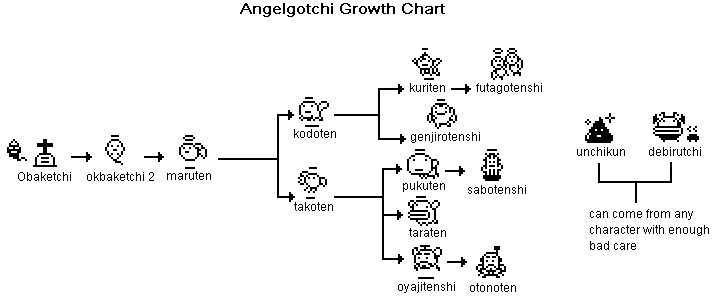
*binary: For a slightly different growth chart, read this topic: viewtopic.php?t=23 *
Other notes about the angelgotch:
Personally i think that the angelgotchi is a great type of tamagotchi, and i recommend it for all ages. Also, unlike most other tamagotchis, you cannot tell which gender it is or name it. But, you can just name it yourself and decide which gender it is yourself. Then you can just write it down on a piece of paper or something. Also, the only way to pause an angelgotchi is by pressing the A and C button on the clock screen. Also, there is only one game and you cant buy anything for it from a shop or anything like that like the v2, v3, etc. But even though it doesnt have all those features, the adorable characters and shell designs are totally worth it. So if you're ever going to get an angelgotchi i hope this guide will help you!!
Also, for information on how to get certain characters and secret characters go here: http://www.mimitchi.com/html/tangch.htm
-ilovetamas!
From the Tama Zone archive: original topic
Hey guys! This here is a guide for angelgotchis that I made.
Lets start out with the basic icons:
Meter icon (first icon): This meter icon allows you to check on an angelgotchi's health, age, good deeds bar, and angelpower. When you select this icon the first screen you will see is how much angel power your angel has and how old your angel is. the first set of numbers is how old your angel is. the second set of numbers below that set is how much angel power your angel has. You get angel power by simply giving your angel a snack, or praising it. that raises your angel power also. The second screen that comes up when you press the B button (middle button) is the training bar. It goes up when when you praise your angel for praying for you. most characters call you when they pray for you, but maruten (child form of angel) doesnt call for you and niether does a few of the unhealthier characters. The third screen that comes up when you press the B button is the hungrey hearts meter. When one or more of the hungrey hearts empties that shows how many pies you have to feed it. The fourth and final screen that comes up when you press the B button is the happy hearts meter. when one or more of these hearts empy, thats when you have to play a game with it. Unlike the other types of tamas where you just have to feed it a snack to fill up the happy hearts, in this case you have to play a game to fill up the hearts. the game you play is a shooting stars game. in this game you have to jump over the shooting stars. if you jump over three stars then that fills one happy heart. jump over all five and you gain three happy hearts.
Fork and knife icon (second icon): This icon allows you to go to the food screen, where you can either feed it pie or candy. The selection at the top is the one that feeds your angel a pie. The one below is the one that feeds it candy. Feed your angel a pie and it fills one hungrey heart. Give it the number of hungrey hearts that are empty. Such as: Your angel has two hungrey hearts emptied. So you give it two pies. Candy on the other hand is just there to raise your angel power. The only way to fill up the happy hearts is by playing a game.
Bat and ball icon (third icon): This icon allows you to play a game with your angelgotch. When u select this icon it automatically starts playing the game. The game is very simple. just press the B button when you think the shooting star is close enough and you will jump over it. If you are too close or too far away from the shooting star and you jump then you will either land on top of it or just get run over by it lol. If u dont jump over a star sucessfully then it will go to a screen where your angel is a bit angrey. just press the C button (last button) to exit off of this screen and go back to the game. to stop playing the game simply press the C button during the middle of the game to stop. If you don't press the C button, then the game will continue untill you do.
Duck icon (fourth icon): This icon allows you to clean up after your angelgotch when it poops. I've observed that it only poops after praying for you, though.
Mouth icon (fifth icon): This icon allows you to praise your angelgotchi for when it prays for you. Unlike other tamas, you cannot give it a time-out. ive observed that this icon looks a bit like pac-man with noise coming out of his mouth lol.
Shot icon (sixth icon): this icon allows you to heal your angel when it's sick. To tell you that it's sick it will look a bit angrey and it will have a skull over its head. If it has been sick for a while then it will eventually call you.
Light bulb icon (seventh icon): This icon will let you turn the lights on or off for when your angel falls asleep. the first selection turns the lights on, the other off.
Face icon (eighth icon): like most other tamas this icon lights up after it calls for you and when it needs attention in some way. Your angelgotchi will call you when its sick, when its evolving, when its praising you, and when it falls asleep. You can't select this icon.
And thats all of the icons.
Heres basically how you start up your angel when you get it out of the packaging:
When you first get your angelgotchi remove the tab from the side of your angelgotchi. Then press the reset button on the back of your angel with a pen or other pointed object. (Quick note: unlike the v1, v2, etc. the reset button is on the top left side on the back of your angel, right under the top left screw.) After you reset your angel a ghost next to a grave will appear. this is the ending screen for the P1 and P2, and the beggining screen for the angelgotchi. It's pretty much the "egg" form of an angel, and like on v1 v2 etc, you cant play with it except for setting the time. Once the ghost appears, press the B button (middle button) and the clock screen will appear. Set the clock by doing this: The A button (first button) will change the hour of day. The B button will set the minute. Press the C button (last button) to end the time setting. unlike the v1, v2, etc. you can't set the date. -_- After you set the clock, press the B button to go back to your ghost. After waiting a few minutes on the ghost screen, an obaketchi will appear. It is the baby form of the angelgotchi. there is only one child form of the angelgotchi, and it's maruten. No matter how you take care of it, it will always evolve into a maruten.
Growth Chart:
*binary: For a slightly different growth chart, read this topic: viewtopic.php?t=23 *
Other notes about the angelgotch:
Personally i think that the angelgotchi is a great type of tamagotchi, and i recommend it for all ages. Also, unlike most other tamagotchis, you cannot tell which gender it is or name it. But, you can just name it yourself and decide which gender it is yourself. Then you can just write it down on a piece of paper or something.
Also, the only way to pause an angelgotchi is by pressing the A and C button on the clock screen. Also, there is only one game and you cant buy anything for it from a shop or anything like that like the v2, v3, etc. But even though it doesnt have all those features, the adorable characters and shell designs are totally worth it. So if you're ever going to get an angelgotchi i hope this guide will help you!!Also, for information on how to get certain characters and secret characters go here: http://www.mimitchi.com/html/tangch.htm
-ilovetamas!
From the Tama Zone archive: original topic