Music Star/V6 Item Code Generator
Posted: Wed Sep 23, 2026 9:18 pm
Originally posted on Tama Zone by User7101 · 1 January 2010
Note (2026): Many of the password generators linked on the old Tama Zone are no longer online. Tama Planet now hosts generators for: Connection V3 and V4/4.5 · V5, V5C and V5R · Entama & Uratama · Hanerutchi 2 · TamaGo · TamaSuku 1/2 · Tama Friends.
Hey guys, long time no see.
Recently got a Music Star for Christmas, and I have been messing around with Music City's gotchi points system and the item code system.
I have uploaded my item generator, so you can generate item codes easily.
I may release my system that can give you 1000 Gotchi, 1000 Producer Exp and 1000 CD Points. Only trouble is, you have to find your account ID using wireshark, which is not fun. I will try and find an easy way to get your account ID using another system.
--------------------
Onto the generator:
This is a simplified version of my item generator, I still need to finish my item lists, there are 3 categories; instruments/toys, items and food
So lets get onto the generator;
You will need the two following things:
- Your current login code
- Your TAMAGOTCHI Username (NOT your Music City one!)
Next navigate to the following page:
- http://musicstargen.site40.net/
Click on the link called "Item Code Generator", and you will need to enter your login code and username and type in the category number. Click on the "Item List" link, there are currently only items. I need to complete the toys/instruments and food lists, I would appreciate any help
When you have filled in all of the boxes. Click the submit button and a page will come up, if it says "ResultCode=ERROR" you have done something wrong. If it says "ResultCode=OK", you have suceeded.
To get the item code, look in the string of text and find something that says "ItemPassword=123456". Press the A button on the tamagotchi and then type in the code. Once you have got all your wanted items, just exit the password menu, don't bother about the logout code.
I hope I have helped, I might have to simplify the gen more.
Added by User7101 · 2 January 2010
Ok, i'll look into the problem, probably one of the fields xD
EDIT: Should work now, tested it with my music star
For a destiny star you put the these boxes as follows:
- Category: 2
- Itemcode: 42(boys destiny) or 43(girls destiny)
You don't need the bits in brackets, just the numbers.
Added by WarOmnimon · 2 January 2010
I've confirmed this Music Star item generator as officially working - I got a Girl's Destiny Star a little while ago. Now all I have to do is wait for Abbie to reach adulthood.
Ahem. Enough about my personal experience with this generator... On behalf of everyone here at Tama-Zone, staff and community, you get a huge "thanks" for this one. You are officially the hero to everyone who has had trouble building their CD levels on Music City, and so on and so forth.
I'll put it in short term for everyone here - This item generator works. I'm going to sticky this thread so that everyone notices it - what a great accomplishment not just for JC1, but for everyone who's been waiting patiently for something like this to come up.
Added by User7101 · 2 January 2010
I will add a little notice to the generator page telling people to type all login codes and usernames in capitals. I will also try to make it capitalise all characters first.
EDIT: No need for the notice, all characters typed are converted to uppercase, numbers are fine too.
I will jazz it up a little tomorrow, maybe a bit more user friendly.
Added by Honeichigo · 3 January 2010
I was working on the Toys/Instruments and heres the list:
1: Helicopter
2: spaceship
3: Robot
4: U.F.O.
5: Train
6: Pirate Ship
7: Dinosaur
8: Skateboard
9: Rabbit
10: Bear
11: Horse
12: Duck
13: Panda
14: Mirror
15: Dress
16: Doll House
17: Book
18: Ball
19: Laptop
20: Camera
21: Tamagotchi
22: Bandai
23: Globe
I think It only goes up to 23 and its all toys only in Category #1
I noticed after a while, You have to re-type a new log in code because there's a limit of Ten item passwords.
Glad to help! Ill work on the Food next.
Food List:
1: Omelette
2: Fries
3: Hamburger
4: Kebab
5: Drum Stick
6: Sandwich
7: Fish
8: Beef Bowl
9: Bread
10: Sushi Roll
11: Pizza Slice
12: Teriyaki Chicken
13: Taco
14: Sausage
15: Hot Dog
16: Cereal
17: Loco Moco
18: Corn
19: Scone
20: Fried Chicken
21: Waffle
22: Choco Bar
23: Turkey
24: Noodles
25: Steak
26: Pasta
27: Sushi
28: Lobster
29: Mega Pizza
It wont go up to 30.
First part of Item List:
1: Wig
2: Sun Glasses
3: Bow
4: Skirt
5: Toothbrush
6: Cap
7: Jeans
8: Chest
9: Diet Drink
10: Hair Gel
11: Slide
12: Plant
13: Shovel
14: Mirror
15: Make Up
16: Stereo
17: Classic CD
18: Jazz CD
19: ? -wont work-
Added by User7101 · 3 January 2010
Thanks for the new item lists, I have added the toys one and will add the rest later. Also there is a little credits for you
I just realised that the instruments category is number 0, so I have added the lists of instruments.
Added by User7101 · 23 January 2010
Great too hear your enjoying it, comes in handy now as I am out of cash on the tamagotchi, so i can't buy food for my mametchi, now i'm going to generate some food codes
EDIT:
Found out when mametchi eats omelete he says great after eating it and hungry and happiness increase. Noticed that dreamtchi says great after eating loco moco.
Wonder if this is character based, or just certain foods.
Added by Tamasock · 24 January 2010
Is this item able to be brought to a music star?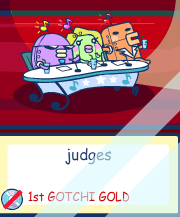
If it is, I hope we can figure out the code!
Added by SamJJE101 · 24 January 2010
@Tamasock: I believe it's really just for bragging rights, and showing off in your Music City Apartment. o_O
Yes, I do believe you need around 50,000 CD EXP to get your CD to 4th Gold. Not 100% sure about the others, but I think that you need 100,000 CD EXP for a 3rd Super Gold CD, 200,000 CD EXP for a 2nd Ultimate Gold CD and 300,000 CD EXP for 1st Gotchi Gold. If you guys are wondering, the '1st Gotchi Gold' icon is a Golden CD with a Gotchi Crown atop, and maybe some sparkles.
I might make a list of the amount of CD EXP you need to upgrade your CD Rank later. But, as I'm already a Level 50, I wouldn't know how much Producer EXP you need to Level Up, though. =[
[SamJJE101]
Added by -Ra- · 11 July 2010
I tried using this so I could transfer some GPs to my Tama-Go. However, when I click the "Points Generator" and put in my username at the bottom and hit submit, I just get an error message. Am I supposed to be logged in at Tamatown.com before trying this?
*Edit: I tried logging and doing it again, yet I get an error message still. Just what's supposed to happen when you click submit?
Ra,
Added by -Ra- · 11 July 2010
I have, it just shows me my music city username: Ra1986. I even tried putting that in at the bottom of the points generator before clicking submit, but still nothing. What's supposed to happen exactly? Is it supposed to give me a log out code to put in my Tama-Go? I'm lost.
Could someone perhaps give me a step-by-step instructions? I feel rather silly that I'm unable to figure out what I'm doing wrong. :\
Ra,
Added by !Gotchi-Gotchi! · 11 July 2010
So:
EDIT: Fixed a typo, Tama-Zone said I said a bad word but I spelt account wrong. X)
Added by Claiken · 29 November 2010
Hopefully soon. I hate how hard it is to get points on here...
Once you have a sucessful band your golden, but until then........... bandai really screwed us here.
(70 conversational replies were left out. The full discussion is in the archive.)
From the Tama Zone archive: original topic
Note (2026): Many of the password generators linked on the old Tama Zone are no longer online. Tama Planet now hosts generators for: Connection V3 and V4/4.5 · V5, V5C and V5R · Entama & Uratama · Hanerutchi 2 · TamaGo · TamaSuku 1/2 · Tama Friends.
Hey guys, long time no see.
Recently got a Music Star for Christmas, and I have been messing around with Music City's gotchi points system and the item code system.
I have uploaded my item generator, so you can generate item codes easily.
I may release my system that can give you 1000 Gotchi, 1000 Producer Exp and 1000 CD Points. Only trouble is, you have to find your account ID using wireshark, which is not fun. I will try and find an easy way to get your account ID using another system.
--------------------
Onto the generator:
This is a simplified version of my item generator, I still need to finish my item lists, there are 3 categories; instruments/toys, items and food
So lets get onto the generator;
You will need the two following things:
- Your current login code
- Your TAMAGOTCHI Username (NOT your Music City one!)
Next navigate to the following page:
- http://musicstargen.site40.net/
Click on the link called "Item Code Generator", and you will need to enter your login code and username and type in the category number. Click on the "Item List" link, there are currently only items. I need to complete the toys/instruments and food lists, I would appreciate any help
When you have filled in all of the boxes. Click the submit button and a page will come up, if it says "ResultCode=ERROR" you have done something wrong. If it says "ResultCode=OK", you have suceeded.
To get the item code, look in the string of text and find something that says "ItemPassword=123456". Press the A button on the tamagotchi and then type in the code. Once you have got all your wanted items, just exit the password menu, don't bother about the logout code.
I hope I have helped, I might have to simplify the gen more.
Added by User7101 · 2 January 2010
Ok, i'll look into the problem, probably one of the fields xD
EDIT: Should work now, tested it with my music star
For a destiny star you put the these boxes as follows:
- Category: 2
- Itemcode: 42(boys destiny) or 43(girls destiny)
You don't need the bits in brackets, just the numbers.
Added by WarOmnimon · 2 January 2010
I've confirmed this Music Star item generator as officially working - I got a Girl's Destiny Star a little while ago. Now all I have to do is wait for Abbie to reach adulthood.
Ahem. Enough about my personal experience with this generator... On behalf of everyone here at Tama-Zone, staff and community, you get a huge "thanks" for this one. You are officially the hero to everyone who has had trouble building their CD levels on Music City, and so on and so forth.
I'll put it in short term for everyone here - This item generator works. I'm going to sticky this thread so that everyone notices it - what a great accomplishment not just for JC1, but for everyone who's been waiting patiently for something like this to come up.
Added by User7101 · 2 January 2010
I will add a little notice to the generator page telling people to type all login codes and usernames in capitals. I will also try to make it capitalise all characters first.
EDIT: No need for the notice, all characters typed are converted to uppercase, numbers are fine too.
I will jazz it up a little tomorrow, maybe a bit more user friendly.
Added by Honeichigo · 3 January 2010
I was working on the Toys/Instruments and heres the list:
1: Helicopter
2: spaceship
3: Robot
4: U.F.O.
5: Train
6: Pirate Ship
7: Dinosaur
8: Skateboard
9: Rabbit
10: Bear
11: Horse
12: Duck
13: Panda
14: Mirror
15: Dress
16: Doll House
17: Book
18: Ball
19: Laptop
20: Camera
21: Tamagotchi
22: Bandai
23: Globe
I think It only goes up to 23 and its all toys only in Category #1
I noticed after a while, You have to re-type a new log in code because there's a limit of Ten item passwords.
Glad to help! Ill work on the Food next.
Food List:
1: Omelette
2: Fries
3: Hamburger
4: Kebab
5: Drum Stick
6: Sandwich
7: Fish
8: Beef Bowl
9: Bread
10: Sushi Roll
11: Pizza Slice
12: Teriyaki Chicken
13: Taco
14: Sausage
15: Hot Dog
16: Cereal
17: Loco Moco
18: Corn
19: Scone
20: Fried Chicken
21: Waffle
22: Choco Bar
23: Turkey
24: Noodles
25: Steak
26: Pasta
27: Sushi
28: Lobster
29: Mega Pizza
It wont go up to 30.
First part of Item List:
1: Wig
2: Sun Glasses
3: Bow
4: Skirt
5: Toothbrush
6: Cap
7: Jeans
8: Chest
9: Diet Drink
10: Hair Gel
11: Slide
12: Plant
13: Shovel
14: Mirror
15: Make Up
16: Stereo
17: Classic CD
18: Jazz CD
19: ? -wont work-
Added by User7101 · 3 January 2010
Thanks for the new item lists, I have added the toys one and will add the rest later. Also there is a little credits for you
I just realised that the instruments category is number 0, so I have added the lists of instruments.
Added by User7101 · 23 January 2010
Great too hear your enjoying it, comes in handy now as I am out of cash on the tamagotchi, so i can't buy food for my mametchi, now i'm going to generate some food codes
EDIT:
Found out when mametchi eats omelete he says great after eating it and hungry and happiness increase. Noticed that dreamtchi says great after eating loco moco.
Wonder if this is character based, or just certain foods.
Added by Tamasock · 24 January 2010
Is this item able to be brought to a music star?
If it is, I hope we can figure out the code!
Added by SamJJE101 · 24 January 2010
@Tamasock: I believe it's really just for bragging rights, and showing off in your Music City Apartment. o_O
Yes, I do believe you need around 50,000 CD EXP to get your CD to 4th Gold. Not 100% sure about the others, but I think that you need 100,000 CD EXP for a 3rd Super Gold CD, 200,000 CD EXP for a 2nd Ultimate Gold CD and 300,000 CD EXP for 1st Gotchi Gold. If you guys are wondering, the '1st Gotchi Gold' icon is a Golden CD with a Gotchi Crown atop, and maybe some sparkles.
I might make a list of the amount of CD EXP you need to upgrade your CD Rank later. But, as I'm already a Level 50, I wouldn't know how much Producer EXP you need to Level Up, though. =[
[SamJJE101]
Added by -Ra- · 11 July 2010
I tried using this so I could transfer some GPs to my Tama-Go. However, when I click the "Points Generator" and put in my username at the bottom and hit submit, I just get an error message. Am I supposed to be logged in at Tamatown.com before trying this?
*Edit: I tried logging and doing it again, yet I get an error message still. Just what's supposed to happen when you click submit?
Ra,
Added by -Ra- · 11 July 2010
I have, it just shows me my music city username: Ra1986. I even tried putting that in at the bottom of the points generator before clicking submit, but still nothing. What's supposed to happen exactly? Is it supposed to give me a log out code to put in my Tama-Go? I'm lost.
Could someone perhaps give me a step-by-step instructions? I feel rather silly that I'm unable to figure out what I'm doing wrong. :\
Ra,
Added by !Gotchi-Gotchi! · 11 July 2010
Okay Ra.-Ra- @ Jul 11 2010, 05:35 PM wrote:I have, it just shows me my music city username: Ra1986. I even tried putting that in at the bottom of the points generator before clicking submit, but still nothing. What's supposed to happen exactly? Is it supposed to give me a log out code to put in my Tama-Go? I'm lost.
Could someone perhaps give me a step-by-step instructions? I feel rather silly that I'm unable to figure out what I'm doing wrong. :\
Ra,
So:
- </li>
- Go to the Account ID Finder and enter your Username and Password.
- You should get something along the lines of this:ResultCode=OK&ServerDate=20100711014626&UID=137&HDName=HI7890...
- That ID is the number of the account you have. For example, the account GOTCHIGOTCHI is #137, meaning it's either the 137th or 138th Music City account created. Anyhow, copy the numbers in the bold bit, in my case it's 137, into the Music City TamaTown Points Gainer.
- Set everything to 1000 points, though only the Gotchi Points matter if you have a Tama-Go (the other things are only applicable for Music Stars) and click Submit.
- You should get something like this:
The bold bit is how many points, including the amount you just added to it, you currently have in your Music City TamaTown account.ResultCode=OK&Point=54340&Pexp=54180&CDexp=0&ServerDate=20100711014956 - Oh yeah, I almost forgot: at the page showing the script that syas how many points are in your account, press Refresh (or F5 in Internet Explorer) to continually resubmit the screen and have 1000GP added and readded into your account at literally the press of a button!
- Happy Tama-Go money transferring! PS. The reason I have nearly 55,000GP in my account is because when this Points Generator was first written up, I had a lot of spare time on my hands and no interest in Music City. I was just doing it for the heck of it, and when the Tama-Go comes out, my work will have finally paid off! *stops talking, and volunteers to help get all of my spit off Ra's face*
EDIT: Fixed a typo, Tama-Zone said I said a bad word but I spelt account wrong. X)
Added by Claiken · 29 November 2010
hopefully soon... Not working for me - for items or points actually. keep reverting to the ID finder saying i didnt fill in all fields (regardless of being under points of items generator).JamesChaplin1 @ Sep 2 2010, 10:51 PM wrote:Bandai have updated the points system, so that the new games can use it. Seems like i'll have to find a new exploit.
Hopefully soon. I hate how hard it is to get points on here...
Once you have a sucessful band your golden, but until then........... bandai really screwed us here.
(70 conversational replies were left out. The full discussion is in the archive.)
From the Tama Zone archive: original topic